

For Black Friday on Shopify, reward bigger carts instead of cutting every price: a free shipping threshold, quantity tiers, a bundle or a Buy X, get Y offer. Hokku shows each of these offers where the customer decides, on the product page or across the store, and applies the discount at checkout with no code to type.
A sitewide discount gives margin away on every order. An offer that raises order value gives it away only in exchange for a bigger cart. This guide shows the difference in dollars, offer by offer.
What does a sitewide Black Friday discount cost you?
A sitewide discount lowers the price of every order. That includes the orders customers would have placed at full price.
Here is an example. Every figure is an example: use your own.
- A store sells a $50 product that costs it $25.
- At full price, the store keeps $25 per order.
- With 20% off sitewide, the customer pays $40. The store keeps $15.
- That is $10 less on every order. Over 1,000 Black Friday orders, it is $10,000 of margin given away.
The discount brings new buyers, but it also discounts the customer who was ready to pay $50. Nothing in the cart grows in return.
Which offers raise order value instead of a sitewide discount?
Four offers ask the customer to add something before they save. Each one fits a different way of buying.
| Offer | What the customer does to save | Where it fits | What you give away |
|---|---|---|---|
| Sitewide discount | Nothing more | Every product | Margin on every order |
| Free shipping | Spends up to your threshold | The whole store | Shipping on the orders that reach it |
| Quantity tiers | Buys more units of the same product | Products people use up | Part of the margin on each unit, per tier |
| Bundle | Buys products that go together | Products used together | Part of the margin on the set |
| Buy X, get Y | Buys a set quantity of one product | Products bought again | One unit, free or at a reduced price |
All four are in one Hokku app, and all four are on every plan, Free included. For the full list of offers that raise average order value, read how to increase AOV on Shopify.
Where does native Shopify stop on Black Friday offers?
Shopify makes a sitewide sale easy: one automatic discount in Discounts. The offers that raise order value are harder to sell natively.
- Quantity tiers. Each tier is a separate discount, and Shopify doesn’t show them on the product page by default.
- Free shipping. The rule applies at checkout. Nothing counts down to it before checkout, unless you write a fixed sentence yourself.
- Buy X, get Y. Shopify’s help center states that the free or discounted item is never automatically added to the cart.
- Bundles. A native bundle lives on its own product page. The page of a single item doesn’t mention it.
An offer the customer never sees does not change the cart. Hokku shows each of them on the page where the customer decides.
How does a free shipping threshold work on Black Friday?
A free shipping threshold gives free delivery above an order amount. The customer adds an item instead of paying for shipping.
What Hokku does: once the Hokku app embed is turned on in your theme, a banner shows how much is left to spend, on every page, and updates as the cart changes. The amount comes from your own Shopify shipping rule. Hokku reads it and never changes your shipping rates. It also shows your median order value over the last 90 days and suggests a threshold from it.
Here is an example, with round figures:
- Your free shipping threshold is $60. Shipping costs you $8 per order.
- A customer at $45 adds a $20 item that costs you $8, to reach the threshold.
- You keep $12 on the item, minus the $8 of shipping now free: $4 more than the order without the item.
- A customer who stays below $60 pays full price and pays for shipping. You give nothing away.
Set the amount a little above your typical order, and check how many orders already reach it. The full method is in how to set a free shipping threshold on Shopify.
How do quantity discounts work for Black Friday?
A volume discount lowers the unit price as the quantity goes up: buy 2, save 10%; buy 3, save 15%. It suits products people use up or buy as gifts for several people.
What Hokku does: up to five tiers in one offer, shown on the product page as selectable cards or a price table. Once a tier is reached, every unit drops to that tier’s price. Before you publish, “Check my margin” shows what you keep per unit at each tier, using the cost per item in Shopify.
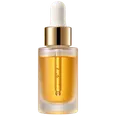
Choose your pack
 Reusable cotton padsFree
Demonstration: nothing can be bought from this page.
Example: a Hokku volume discount, with the saving shown on each tier.
Here is an example, with round figures:
- A candle sells for $20 and costs you $8. One candle at full price leaves you $12.
- At “buy 2, save 10%”, the customer pays $36 for two. You keep $20.
- A sitewide 10% off on one candle leaves you $10.
The tier gives the same 10% away. It asks for a second candle in return. Tier setup and margin checks are covered in how to create volume discounts on Shopify.
Should you sell bundles for Black Friday?
Yes, when your products are used together. A bundle sells several products as one set, for less than the sum of their prices: a cleanser, a serum and a cream; a grinder and a bag of beans.
What Hokku does: Hokku shows the bundle on the product pages of the items it contains, next to the item alone. The item alone stays selected by default, and the customer chooses to switch to the set. From the Starter plan, customers can also build their own pack from your selection.
Build your pack
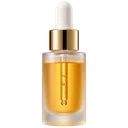 Glow face serum$39.90
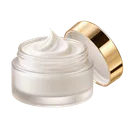 Hydrating cream$29.90
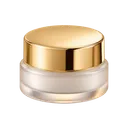 Eye cream$25.90
Demonstration: nothing can be bought from this page.
Example: a Hokku bundle, with the full routine as an option.
Here is an example, with round figures:
- A serum and a cream sell for $30 each and cost you $12 each.
- One serum alone leaves you $18.
- The pair at $51 (15% off) leaves you $27.
A Black Friday bundle also works as a gift set, ready to buy in one click. To match each bundle format to a way of buying, read Shopify bundles: one offer for every way to buy.
When does Buy X, get Y beat a percentage off?
When you want customers to buy more units of one product, not to pay less for one. Buy X, get Y rewards a quantity: buy 3 candles, get a fourth free. Its classic one-for-one form is Buy one, get one (BOGO).
What Hokku does: Hokku shows the offer on the product page, with up to three tiers. When the customer picks a tier, Hokku sets the quantity for them. The discount applies automatically in the cart. By default, the cheapest unit in the cart is the free one, which protects your margin, and you can cap the offer per order.
Here is an example, with round figures:
- A candle sells for $20 and costs you $8.
- With 25% off sitewide, a customer who wanted one candle pays $15. You keep $7.
- With “buy 3, get 1 free”, the customer pays $60 for four. The four cost you $32. You keep $28.
The saving per unit is the same 25%. Buy X, get Y gives it only to the customer who takes four.
How do you set up Black Friday offers in Hokku before November 27?
Black Friday falls on November 27, 2026. Five steps cover the four offers.
- Pick your free shipping threshold. Start a little above your median order value, set the rule in Settings > Shipping and delivery, then turn on the Hokku app embed.
- Add quantity tiers to the products people stock up on. Two or three tiers. Check the margin of the deepest tier first.
- Build one bundle around your best seller. Add the item customers most often need with it.
- Add Buy X, get Y where an extra unit costs you little. Keep the cheapest unit as the free one. Set a cap per order if a large order would cost too much.
- Keep one offer per product page. Quantity tiers next to a bundle give the customer two decisions instead of one.
Write down your margin per order before Black Friday, then with each offer used at its maximum. If the second number is lower, change the offer before it goes live. The offer calculator runs this check with your own figures.
Which Hokku plan do you need for Black Friday offers?
Free shipping, volume discounts, bundles and Buy X, get Y are on every Hokku plan, Free included.
- Free: up to $200 actually earned by your offers every 30 days, 1,000 widget views a month and 3 active offers.
- Starter: adds free gift tiers and the build-your-own bundle (Mix & Match).
- Pro: adds A/B tests, for example two tier sets on the same product, so you keep the version that earns you more.
Hokku never takes a percentage of your sales. The pricing page lists what each plan includes.
What do merchants ask about Black Friday offers?
Should I run a sitewide discount on Black Friday?
Only if your margin can take it on every order. A sitewide discount also lowers the price for customers who would have paid full price. Offers that raise order value give something back only when the customer adds to the cart.
What is the best Black Friday offer for a Shopify store?
The one that matches how your customers buy. Quantity tiers and Buy X, get Y suit products people use up. A bundle suits products used together. A free shipping threshold works across the whole store. With Hokku, all four live in one app.
Can I run several Black Friday offers at once on Shopify?
Yes, on different products or surfaces. A free shipping banner across the store can sit next to quantity tiers on one product and a bundle on another. Keep one offer per product page, so the customer has one decision to make.
Does Shopify show Black Friday offers on the product page?
Not on its own. Shopify applies discounts in the cart and at checkout. Quantity tiers and Buy X get Y discounts are not shown on the product page by default. Hokku shows each offer on the product page, before the add to cart.
Can I use Hokku for Black Friday on the Free plan?
Yes. Free shipping, volume discounts, bundles and Buy X, get Y are all on the Free plan. It covers up to $200 actually earned by your offers every 30 days, 1,000 widget views a month and 3 active offers.